The Yuneec Mantis Q is a folding camera drone controlled through its remote and the Yuneec Pilot app. Complete the phone connection, calibration and GPS checks before the first outdoor flight, and remember that its highest-resolution video is not stabilised in the same way as lower-resolution recording.
I set up a Yuneec Mantis Q for a reader switching from a phone-based drone app and the Yuneec Pilot app kept failing to detect the controller until we found the USB cable was a charge-only cable, not a data cable. Swapping in a proper data cable let the app connect within seconds.
This post covers the original Mantis Q rather than the later gimbal-equipped Mantis G. It explains the battery, app connection, camera limits, voice commands, indoor positioning and the faults that are common when an older stored drone is returned to service.
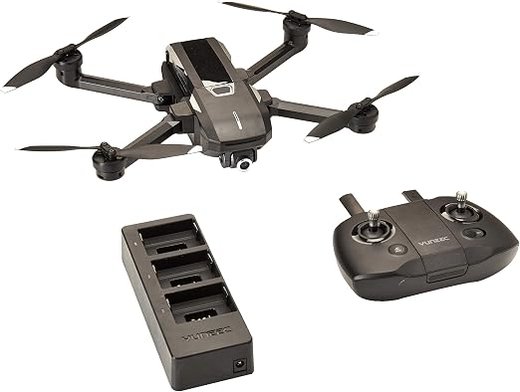
Setup path
Key specifications
Item Details Aircraft type Folding GPS camera drone Battery 3S 2800mAh LiPo Claimed flight time Up to about 33 minutes Maximum sport speed Up to about 72km/h Camera 4K recording with electronic stabilisation at…
Identify the Mantis Q before downloading software
The Mantis Q and Mantis G look similar, but the camera systems are different. The Q uses electronic image stabilisation in supported lower-resolution modes, while the G adds a mechanical gimbal. Check the label under…
Charge and inspect an older Mantis Q battery
The original battery is a 3S 2800mAh LiPo pack. A pack that has been stored for a long time should be inspected before charging. Swelling, damaged contacts, a split case or a large cell-voltage difference means the pack…
Connect the controller and Yuneec Pilot app
Charge the controller and install the phone in its holder. Connect the phone with the correct data cable or adapter. Open Yuneec Pilot and allow required permissions. Power the controller, then power the aircraft on a…
Key specifications
| Item | Details |
|---|---|
| Aircraft type | Folding GPS camera drone |
| Battery | 3S 2800mAh LiPo |
| Claimed flight time | Up to about 33 minutes |
| Maximum sport speed | Up to about 72km/h |
| Camera | 4K recording with electronic stabilisation at supported lower modes |
| Control | Remote controller plus Yuneec Pilot app |
| Positioning | GPS outdoors and IPS sensors for suitable indoor use |
Identify the Mantis Q before downloading software
The Mantis Q and Mantis G look similar, but the camera systems are different. The Q uses electronic image stabilisation in supported lower-resolution modes, while the G adds a mechanical gimbal. Check the label under the aircraft and the camera shape before following update instructions.
Use the Yuneec Pilot app intended for the Mantis family. Old app-store availability can vary by phone region and operating-system version, so keep a working installation backed up before replacing the phone used with the drone.
- Do not install firmware intended for Mantis G.
- Do not assume a current Yuneec enterprise app supports Mantis Q.
- Record the aircraft, controller and app versions before changing anything.
- Test with the original USB cable or phone adapter when connection is unreliable.
Charge and inspect an older Mantis Q battery
The original battery is a 3S 2800mAh LiPo pack. A pack that has been stored for a long time should be inspected before charging. Swelling, damaged contacts, a split case or a large cell-voltage difference means the pack should not be used.
Flight-time claims assume a healthy pack and calm conditions. Cold cells, high-speed flight, repeated climbing and strong wind reduce usable time. Land with a reserve instead of waiting for an emergency low-battery action.
- Charge on a non-flammable surface.
- Allow the pack to cool before charging.
- Do not leave it fully charged for extended storage.
- Stop using a pack that heats unusually during a gentle hover.
Connect the controller and Yuneec Pilot app
- Charge the controller and install the phone in its holder.
- Connect the phone with the correct data cable or adapter.
- Open Yuneec Pilot and allow required permissions.
- Power the controller, then power the aircraft on a level surface.
- Wait for the app to show aircraft telemetry and live video.
- Confirm the home point and satellite status before takeoff.
A phone can charge from the controller and still fail to carry data. When the app does not detect the controller, test a known data-capable cable, clean the connector and remove thick phone cases that prevent full insertion.
Disable aggressive battery saving for the app during testing. Some phones suspend USB accessories, background video or location access when power saving is active.
Camera settings and stabilisation limits
The Mantis Q can record high-resolution video and JPEG or DNG stills. Its camera can tilt upward slightly and downward for aerial views. However, the stabilisation behaviour depends on the selected recording mode.
Use a supported stabilised mode when smooth footage matters more than maximum resolution. High-resolution footage can show aircraft movement more clearly because there is no three-axis mechanical gimbal on this model. Fly slowly, avoid sudden yaw inputs and use calm conditions.
| Goal | Suggested approach | Reason |
|---|---|---|
| Smooth travel clips | Use a supported electronically stabilised mode | Reduces visible aircraft movement |
| Maximum detail | Use the highest available resolution | More detail but more visible movement |
| Still photos | Use JPEG for convenience or DNG for editing | DNG keeps more adjustment latitude |
Calibration and first outdoor flight
Calibrate only when the app asks or when the aircraft shows a clear sensor warning. Perform compass calibration away from cars, reinforced concrete, speakers, power cables and magnetic phone accessories.
For the first outdoor test, choose a wide area with no people, trees or power lines. Wait for a stable GPS lock and home-point confirmation. Hover at low altitude, check stick direction, camera tilt and return-to-home behaviour before flying farther away.
Indoor positioning and voice control
The Mantis Q includes indoor positioning sensors, but indoor flight is not the same as GPS flight. The downward system needs light and visible texture. Shiny floors, darkness, repeating tiles and moving surfaces can cause drift.
Voice commands are a convenience feature, not a substitute for the controller. Use them only after the app clearly recognises the command, and keep the controller ready to take over. Noise, accent differences and microphone permissions can affect recognition.
Common Mantis Q problems and fixes
| Symptom | Likely cause | First check |
|---|---|---|
| Drone will not arm | Calibration, GPS, battery or safety lock | Read the app or controller warning before cycling power |
| Video freezes | Weak link, interference or overloaded phone | Move closer, reduce obstructions and close background apps |
| Aircraft drifts | Poor calibration, weak optical flow or wind | Recalibrate on a level surface and test in calm air |
| Short flight time | Aged battery, cold pack or aggressive flying | Check cell condition and compare hover time with another pack |
| Return-to-home looks wrong | Weak home-point lock or compass interference | Wait for a stable GPS lock away from metal objects |
If the live view becomes blocky or freezes, reduce distance and move away from busy Wi-Fi areas. The system can lower the stream quality to keep the link alive. A cached phone video may continue even if the recording on the microSD card has stopped, so verify the card separately.
If the aircraft is found after an unexpected landing, inspect every arm hinge, propeller and motor before powering it again. A folding arm can look normal while the hinge or wiring inside is damaged.
Buying or reviving a used Mantis Q
A used package should include the correct remote, at least one healthy battery, charger, propellers and the required phone cable. Confirm that the app can still be installed on the phone you plan to use.
Before paying, ask for a live demonstration of GPS lock, camera tilt, recording, controller input and a short hover. Replacement batteries and specialised parts may be harder to source than general consumer-drone accessories, so a low purchase price does not always make a neglected unit economical.
Sources and further reading
Conclusion
Use a controlled first-flight process, keep a battery reserve and read the exact controller or app warning before changing settings. Older drones can still work well, but battery health, software availability and replacement parts matter as much as the original specifications.
Frequently Asked Questions
Which app controls the Mantis Q?
The original aircraft uses the Yuneec Pilot app with its supplied controller. App availability and phone compatibility can vary, so confirm installation before buying a used drone.
Does 4K video use full stabilisation?
The Mantis Q relies on electronic stabilisation in supported lower-resolution modes. The highest-resolution mode does not behave like a three-axis mechanical gimbal.
Can the Mantis Q fly indoors?
It can use its indoor positioning system in suitable light and over a textured surface, but drift is still possible and GPS safety features may be unavailable.
What battery does it use?
The original battery is a 3S 2800mAh LiPo pack designed for the Mantis Q.
Why does the app not see the controller?
The most common causes are a charge-only cable, blocked phone connector, missing permissions or an incompatible phone operating-system version.
Ryan has set up several camera drones that pair with a phone-based flight app, learning that a bad USB cable causes more app-detection issues than people expect. He shares these findings at softwaredriverdownload.com.