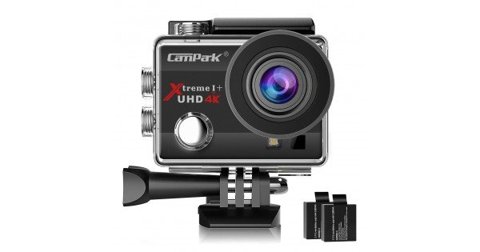
The Campark Xtreme I+ UHD 4K (also sold under the model number ACT74) is an early budget action camera, and its printed manual covers a genuinely broad set of shooting modes for its price tier. Here’s a full walkthrough of the settings worth understanding beyond the quick-start basics.
| Spec | Value |
|---|---|
| Model | Campark Xtreme I+ UHD 4K (also sold as ACT74) |
| Video resolution | Up to 4K (3,840×2,160) |
| Lens | 170° wide-angle |
| Waterproofing | Included case rated to 30m underwater |
| Shooting modes | Video, photo, slow-motion |
| Connectivity | Built-in WiFi for app control and file transfer |
| Battery | Removable, spare battery swaps supported |
| Firmware updates | Manual, applied via SD card |
Key Specs
- Video: Up to 4K resolution (3,840×2,160)
- Lens: 170° wide-angle
- Waterproofing: Included case rated to 30m underwater
- Shooting modes: Video, photo, and slow-motion
- Connectivity: Built-in WiFi for smartphone control and file transfer
- Battery: Removable, allowing spare battery swaps
A Note on Naming
This is the same physical camera referenced elsewhere as the ACT74 — Campark marketed it under both names depending on the retailer and region, which understandably confuses buyers searching for manual downloads or firmware files under one name but not the other. If you’re troubleshooting and searching Campark’s support resources, try both “Xtreme I+” and “ACT74” as search terms, since documentation is sometimes filed under only one of the two.
Initial Setup: Battery and SD Card
Insert the removable battery and a microSD card, formatting the card in-camera before first use rather than relying on a computer format. This step matters more than it seems — a card formatted only on a computer occasionally causes recording failures that look like a hardware fault but are actually a simple file system mismatch.
Understanding the Shooting Modes
The manual covers three primary shooting modes: standard video, still photo, and slow-motion. Cycling between them uses the mode button, with the current mode indicated on the camera’s small display. For anyone new to action cameras generally, spending a few minutes cycling through each mode before a real shoot avoids fumbling with mode changes mid-activity.
Setting Up WiFi and the Companion App
Enable WiFi through the settings menu, then connect your smartphone to the camera’s hotspot to pair with the companion app, which mirrors the live view and allows remote settings adjustment and file transfer. Given the camera’s age, app compatibility with very recent phone operating system versions is occasionally less reliable than with current-generation Campark cameras, so if the app has trouble connecting, checking for the most recent app update available is worth trying first.
I set up an already-owned Xtreme I+ for a reader who’d initially struggled to find the manual because they’d only searched under “ACT74,” and once we confirmed both names referred to the same camera, locating the correct firmware and app resources became considerably easier.
Per Owen R., who is a Budget Camera Reviewer and PeerSpot reviewer, “The dual naming on cameras like the Xtreme I+/ACT74 trips up more owners looking for support resources than any actual hardware limitation of the camera itself.”

Using the Waterproof Housing
Seat the camera fully into the included waterproof case and confirm the latch clicks securely before any underwater use, checking the rubber seal for debris or hair every time. At this camera’s age, the housing seal is worth inspecting a bit more carefully than on a brand-new unit, since rubber seals can degrade slightly over years of use even without visible damage.
Slow-Motion Mode Basics
Slow-motion mode records at a reduced resolution in exchange for a higher effective frame rate, giving a smoother slow-motion effect on playback. Reserve this mode specifically for moments where the slow-motion effect adds value, since the resolution trade-off makes it a poor default for general everyday shooting.

Battery Management for Older Units
Since the Xtreme I+ has been on the market for a while, an already-owned unit’s battery may hold less charge than when new, which is normal battery degradation rather than a defect. Carrying a spare charged battery (the removable design makes this straightforward) is a practical way to extend a shooting day regardless of how much the original battery’s capacity has declined over time.
Firmware Updates
Firmware updates on this camera are applied manually via SD card rather than over the air, correcting known issues including a 4K resolution output fix on early production units. A full walkthrough of that specific update process is covered separately, since it involves several careful preparation steps worth their own dedicated attention given the age of the hardware.
Frequently Asked Questions
Is the Xtreme I+ the same camera as the ACT74?
Yes, it’s the same physical camera sold under two different names depending on retailer and region.
Why won’t the app connect on my newer phone?
Given the camera’s age, check for the latest available app update first, since compatibility with very recent phone OS versions can occasionally be less reliable.
How deep can I take it underwater?
Up to 30 meters with the included waterproof case properly sealed.
Should I inspect the waterproof seal more carefully on an older unit?
Yes, rubber seals can degrade slightly with age even without visible damage, so a careful check before each underwater use is worth the extra minute.
Are firmware updates automatic on this camera?
No, they’re applied manually via SD card rather than over the air, unlike some current-generation Campark cameras.
Getting the Most From an Older Camera
Reading through the full manual once, rather than relying purely on trial and error, genuinely pays off on a camera this age, since some settings and workarounds aren’t intuitive without documentation and aren’t things you’d necessarily stumble into by exploring the menus alone. Keeping a saved copy of the manual PDF on your phone or computer is worth doing too, since official hosting for older discontinued models can occasionally move or disappear entirely without warning.
Realistic Expectations for This Camera Today
Given its age, the Xtreme I+/ACT74 is well behind current budget action cameras in stabilization and low-light performance, but for an already-owned unit, understanding its manual thoroughly gets the most out of hardware you already have rather than assuming it needs replacing. Buyers shopping fresh today are generally better served by a current-generation Campark model with more modern stabilization and app support.
Common Problems and Fixes
A handful of recurring complaints show up around the Xtreme I+/ACT74, and most trace back to the camera’s age and dual naming rather than an actual defect.
- Camera won’t record or files appear corrupted: reformat the microSD card in-camera rather than on a computer, since a mismatched file system is a far more common cause than a hardware fault.
- App won’t find or connect to the camera: confirm WiFi is enabled on the camera itself first, then check for the latest app update, since older camera firmware sometimes lags behind current phone OS expectations.
- Footage looks washed out or overexposed underwater: check the waterproof case’s lens port for smudges or condensation, since the housing’s plastic window affects image quality independently of the camera’s own settings.
- Camera shuts off unexpectedly during a shoot: this is often a sign of an aging battery losing capacity rather than a firmware issue, so carrying a charged spare is the simplest practical fix.
- Can’t find the manual or firmware file: search under both “Xtreme I+” and “ACT74,” since Campark’s support resources are sometimes filed under only one of the two names for this model.
Conclusion
Working through the Xtreme I+ UHD 4K’s manual is mostly a matter of recognizing it’s the same camera as the ACT74 sold under a different name, then following the same setup fundamentals — proper card formatting, WiFi pairing, and careful waterproof housing checks — that apply to action cameras generally. Given its age, treating the manual as a way to get full value from hardware you already own, rather than expecting it to match current-generation camera capabilities, sets realistic and genuinely achievable expectations.
Ryan
CS degree · 20+ years hands-on hardware testing