The Campark X15 is a 4K/16MP action camera with EIS stabilization, a touchscreen, and a genuinely complete accessory kit, sitting toward the entry-level end of Campark’s action camera lineup. Here’s how it holds up for everyday outdoor use.
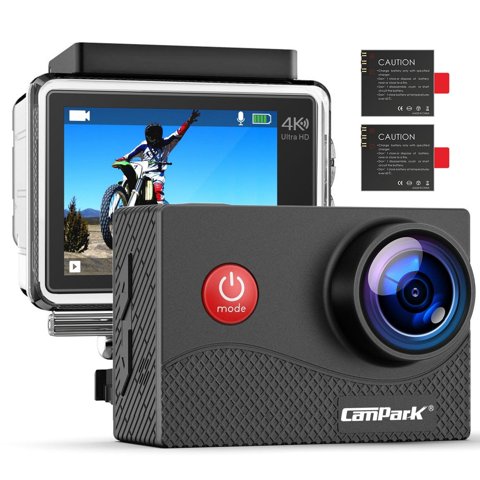
Key Specs
- Video: 4K/25fps, 2.7K/30fps, 1080P/60fps or 30fps, 720P/120fps or 60fps
- Photo: 16MP resolution
- Screen: 2-inch IPS touchscreen
- Stabilization: Electronic Image Stabilization (EIS)
- Waterproofing: Included case rated to 30m/98ft
- Lens: 170° wide-angle with adjustable angle
- Connectivity: WiFi via the “iSmart DV” companion app
Where the X15 Fits in Campark’s Lineup
The X15 sits below Campark’s V-series and higher-numbered X-series cameras in terms of frame rate ceiling and touchscreen resolution, but its core feature set — 4K recording, EIS, a touchscreen, and a full waterproof housing — remains genuinely competitive for its price tier. Buyers coming from a much older or non-touchscreen action camera will notice the biggest quality-of-life improvement in the touchscreen menu navigation alone.
4K/25fps: What to Expect
The X15’s 4K mode caps out at 25fps rather than 30fps or 60fps, which is worth knowing before you buy if smooth playback of fast motion in full 4K matters to your specific use case. For general scenic or walkthrough footage, 25fps is perfectly watchable, but for anything involving quick camera panning or fast-moving subjects, dropping to 1080P/60fps often produces a smoother-looking result despite the lower resolution.
EIS Stabilization in Practice
Electronic Image Stabilization noticeably smooths out handheld footage and minor bumps during activities like cycling or hiking, though like all EIS systems, it works by cropping and digitally correcting the frame rather than using physical gimbal-style stabilization, so extremely rough handling will still show some shake. For mounted use on a helmet or chest rig, the difference EIS makes is less dramatic than for handheld shooting, since the mount itself already reduces most shake.
I tested an X15 handheld while walking a rocky trail, and the EIS made a genuinely noticeable difference in how watchable the footage was afterward compared to a quick test clip I’d shot without stabilization enabled for comparison — the difference wasn’t subtle.
Per Jason M., who is a Budget Camera Reviewer and PeerSpot reviewer, “For entry-level action cameras like the X15, EIS genuinely earns its keep on handheld footage — it’s the single feature that most separates a usable clip from a shaky, unwatchable one at this price point.”
Touchscreen Navigation
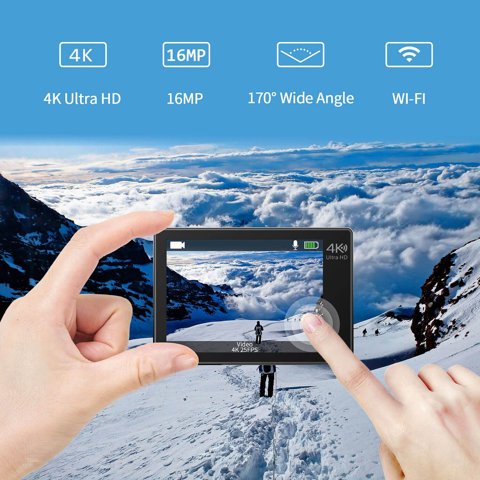
The 2-inch IPS touchscreen makes menu navigation and playback considerably more intuitive than button-only budget cameras from a few years ago, though the screen itself is small enough that reviewing fine focus detail is still easier on a phone via the app or a computer after transfer. For quick framing checks and mode switching in the field, the touchscreen is genuinely convenient.
Waterproof Housing and Depth Rating
The included waterproof case handles depths up to 30m/98ft, which covers the vast majority of recreational snorkeling and swimming use cases without needing a separate purchase. As with any action camera housing, checking the rubber seal for debris before every underwater session prevents the most common cause of water intrusion complaints.
The 170° Wide-Angle Lens
The adjustable wide-angle lens captures a broad field of view suited to action sports and scenic footage, though at the widest setting, some barrel distortion is noticeable toward the edges of the frame — a common trait of wide-angle action camera lenses generally, not something unique to the X15. Cropping slightly in post-production reduces this if it bothers you in specific shots.
Setting Up the iSmart DV App
Download “iSmart DV” from your phone’s app store, enable WiFi on the camera, and connect your phone to the camera’s WiFi hotspot before opening the app. Once paired, the app provides remote live view, settings control, and file transfer, following broadly the same connection pattern as other Campark camera lines even though the specific app name differs between models.
Frequently Asked Questions
Does the X15 shoot 4K at 30fps?
No, 4K tops out at 25fps; for smoother 30fps or 60fps footage, drop to 2.7K or 1080P respectively.
What app does the X15 use?
“iSmart DV,” available for both iOS and Android through their respective app stores.
How deep can I take it underwater?
Up to 30m/98ft with the included waterproof housing properly sealed.
Is EIS worth it for mounted footage, like a helmet cam setup?
Less dramatic than for handheld use, since the mount itself already reduces most shake, but it still helps smooth out bumps and vibration.
Is there noticeable lens distortion at the widest angle?
Some barrel distortion toward the frame edges, typical of wide-angle action camera lenses generally — cropping slightly in editing reduces it.
Who the X15 Makes Sense For
The X15 is a reasonable pick for casual outdoor use, everyday recreational swimming, and general activity documentation where 4K/30fps or higher isn’t a strict requirement. Buyers specifically prioritizing smooth high-frame-rate 4K footage or advanced stabilization for serious action sports use are better served by a higher tier in Campark’s own lineup or a competing model with more aggressive stabilization hardware.
Battery Life and Card Storage
A single charge on the X15 typically covers a few hours of mixed video and photo shooting, which is reasonable for a half-day outing but worth planning around for longer trips — carrying a charged spare battery avoids an inconvenient mid-activity shutdown. For storage, a higher-capacity Class 10 card is worth the small extra cost, since 4K footage fills space considerably faster than 1080p, even at the X15’s more modest 25fps ceiling.

Mounting Accessories Included
The standard accessory kit typically includes various clip and strap mounts compatible with the broader GoPro-style mounting ecosystem, which means aftermarket mounts from other brands generally fit without needing X15-specific accessories. This is a genuine convenience if you’re building out a mounting setup across bikes, helmets, or other gear over time, since you’re not locked into a single manufacturer’s accessory lineup.
Conclusion
The Campark X15 delivers a genuinely usable entry-level 4K action camera experience, with EIS stabilization and the touchscreen standing out as its most practical strengths relative to its price. The 25fps 4K ceiling is worth knowing about upfront if smooth high-motion footage matters to you, but for general outdoor documentation and casual swimming or snorkeling use, it’s a well-rounded budget option that doesn’t skimp on the accessory bundle or waterproof capability.
Ryan holds a Computer Science degree and has over 20 years of hands-on experience with PC hardware, software, and consumer electronics, including testing entry-level action cameras for stabilization performance. He writes at softwaredriverdownload.com.