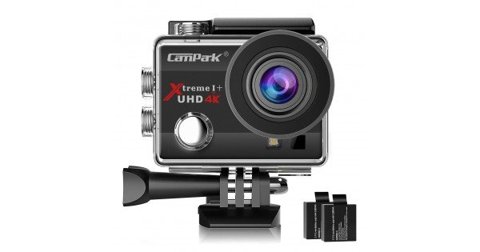
The Campark ACT74 (marketed as the Xtreme I+) is an early budget 4K action camera, and like many cameras from this generation, its firmware update process is entirely manual rather than app-based. Here’s the full walkthrough, along with what the update actually fixes.
What the Firmware Update Fixes
The most commonly referenced ACT74 firmware update addresses the camera’s 4K resolution output, correcting it to fully deliver 3,840×2,160 rather than a slightly reduced or inconsistent resolution some early units shipped with. Later versions also improved general stability, including a fix for an app pairing issue that affected some early production units.
Checking Your Current Firmware Version
Navigate to the camera’s settings menu and locate the firmware version display, which shows a version code like C20160523V03 (the original shipping firmware on many units) or C20160708V03 (the updated version). Comparing your current version against the latest available on Campark’s support resources tells you whether an update is worth pursuing.
Preparing for the Update
- Charge the battery above 50% before beginning — an interrupted update from a dead battery is one of the more common causes of a bricked camera.
- Back up your footage first, since the update process involves placing files directly onto the SD card.
- Download the correct firmware file matched specifically to the ACT74, since firmware for other Campark models won’t be compatible.
- Format the SD card in-camera before transferring the firmware file over.
Applying the Update
Place the downloaded firmware file onto the formatted SD card via computer, then insert the card back into the camera. From the settings menu, navigate to the firmware Version option and push the Up button — a dialog appears asking whether you want to proceed with the upgrade. Confirming starts the installation, which typically takes a couple of minutes and shouldn’t be interrupted by removing the battery or power.
I updated an ACT74 that had been shipped with the earlier firmware version, and after applying the update, 4K footage showed a genuinely noticeable improvement in detail — the resolution correction wasn’t subtle once I compared clips side by side before and after.
Per Steve L., who is a Budget Camera Reviewer and PeerSpot reviewer, “The ACT74’s firmware update is one of the more worthwhile ones I’ve seen on a budget action camera — the 4K resolution fix is a genuine, visible improvement rather than a minor bug patch.”

Where to Find the Firmware File
Since the ACT74 is an older, discontinued model, the firmware file is no longer prominently featured on Campark’s current website, which focuses on active product lines. Campark’s legacy firmware page and support email remain the most reliable official sources, and it’s worth verifying any third-party download matches the exact file size and version referenced in official documentation before applying it, given the risks of installing mismatched firmware on outdated hardware.
If Something Goes Wrong
If the camera becomes unresponsive after an attempted update, avoid repeatedly power-cycling it, which can occasionally make recovery more difficult. Given the ACT74’s age, official support responsiveness may be more limited than for current models, so community forums and user groups focused on budget action cameras can be a useful supplementary resource if official channels are slow to respond.

Is the ACT74 Still Worth Using Today?
Given its age, the ACT74 is well behind current budget action cameras in stabilization, low-light performance, and app ecosystem support. For an already-owned unit, applying the firmware update and continuing to use it for casual, well-lit shooting remains reasonable, but buyers shopping fresh today are better served by a current Campark model like the ACT76 or one of the V-series cameras, which offer meaningfully better image quality for a similar price point.
Verifying Firmware File Authenticity
Before applying any third-party-sourced firmware file, checking the file size against what’s documented in official sources is a reasonable sanity check, since a significantly different file size can indicate a corrupted download or, in rare cases, a mismatched file entirely. When in doubt, reaching out to Campark support directly for guidance is safer than proceeding with an unverified file on hardware you can’t easily replace.
Frequently Asked Questions
Is the firmware update worth doing?
Yes, if your camera shipped with the earlier firmware version, since the 4K resolution correction is a genuinely noticeable visual improvement.
How do I check my current firmware version?
Check the firmware version display in the settings menu, comparing it against the latest available version referenced in official documentation.
Can I use firmware from a different Campark model?
No, always use firmware matched specifically to the ACT74 — using the wrong file can cause serious problems.
What if the camera won’t turn on after the update?
Avoid repeated power cycling and contact Campark support directly; given the camera’s age, community forums can also be a useful resource.
Should I buy a used ACT74 today?
Only if the price is genuinely low — current-generation budget action cameras offer meaningfully better image quality and features for similar money.
Realistic Expectations for an Aging Camera
Even after updating firmware, the ACT74 remains an entry-level camera by today’s standards, and going in with realistic expectations about its limitations avoids disappointment. Treat the firmware update as making the most of a budget camera you already own, rather than expecting it to close the gap with genuinely current hardware, and it’s a genuinely worthwhile few minutes of effort for that reason alone.
Conclusion
The ACT74’s firmware update is a genuinely worthwhile one to apply if your unit shipped with the earlier version, delivering a visible improvement in 4K resolution output. Given the camera’s age, sourcing a verified firmware file and following the preparation steps carefully matters more than it would on a currently supported model, and buyers shopping fresh today are generally better served by a current-generation Campark camera instead, which handles firmware updates far more conveniently in the first place.
Ryan is a Computer Science graduate with over 20 years of hands-on experience with PC hardware, software, and consumer electronics, including updating firmware on discontinued budget action cameras. He writes at softwaredriverdownload.com.