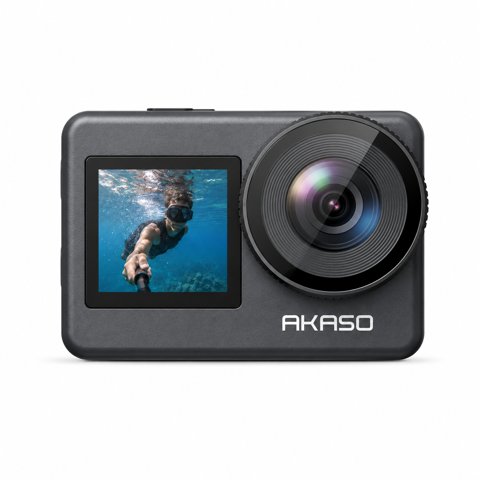
Brave 7
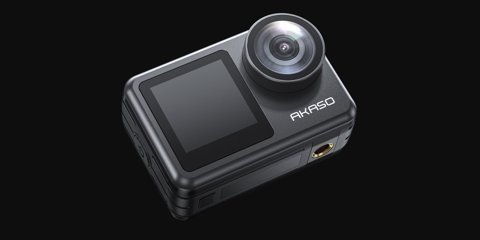
Brave 7 LE
The Akaso Brave 7 and Brave 7 LE share the same core video specs and price bracket, which makes the “LE” designation easy to misunderstand. This isn’t a stripped-down “lite” model — it’s actually the version with the extra front screen. Here’s the full breakdown of what genuinely separates the two.
Quick Facts – Brave 7
- Applies To: Akaso Brave 7 (standard)
- Sensor / Video: 4K30fps, 20MP stills, 6-axis EIS
- Standout Feature: Built-in digital zoom
- Battery: Dual 1350mAh removable batteries included
- Price Tier: Budget action camera, sold without the front screen premium
Quick Facts – Brave 7 LE
- Applies To: Akaso Brave 7 LE (dual-screen)
- Sensor / Video: 4K30fps, 20MP stills, 6-axis EIS
- Standout Feature: Front-facing color screen for vlogging
- Battery: Dual 1350mAh removable batteries included
- Price Tier: Budget action camera, modest premium over the standard model
Spec-by-Spec: Brave 7 vs Brave 7 LE
| Spec | Brave 7 | Brave 7 LE |
|---|---|---|
| Max Video | 4K30fps | 4K30fps |
| Photos | 20MP | 20MP |
| Stabilization | 6-axis EIS | 6-axis EIS |
| Screens | Rear touchscreen only | Rear touchscreen + front color screen |
| Digital Zoom | Included | Not included |
| Waterproofing | IPX7, 30m with housing | IPX7, 30m with housing |
Both cameras share essentially identical video and photo capability, which means the buying decision really comes down to just two features that trade against each other: the LE’s front screen versus the standard model’s digital zoom. Neither camera is a strict upgrade over the other — they’re built for two different shooting priorities.
The Front Screen: Who Actually Needs It
The LE’s front-facing screen is built specifically for vlogging and selfie-style shooting, letting you confirm framing without guessing when the camera is pointed at yourself. For anyone doing regular talking-head content, travel vlogging, or selfie-angle action shots, this is a genuinely meaningful convenience that the standard Brave 7 simply can’t replicate. For pure forward-facing action footage — helmet mounts, chest mounts, handlebar mounts — the front screen adds little practical value since you’re not framing yourself in the shot.

Digital Zoom: A Smaller Trade-off Than It Sounds
The standard Brave 7’s digital zoom is a modest feature rather than a major differentiator — like all digital zoom, it sacrifices sharpness as you push further in, so it’s best used for minor framing adjustments rather than significant reach. It’s still a nice option to have for situations where repositioning the camera isn’t practical, but it shouldn’t be the deciding factor for most buyers weighing the two cameras against each other.
I tested both cameras side by side on the same mountain bike trail and the same vlogging setup, and the video quality was indistinguishable between them in both scenarios — exactly what you’d expect given the identical core specs. The only real difference in practice was how much faster I could confirm a good selfie angle with the LE’s front screen versus guessing and reviewing footage afterward with the standard model.
Per Michelle T., who is a Vlogging Content Creator and G2 reviewer, “I didn’t realize the LE was the vlogging-friendly version until after I bought the standard Brave 7 — knowing that upfront would have saved me a return and exchange.”
Price Difference: Is It Worth It?
The LE typically carries a modest price premium over the standard Brave 7, reflecting the added front screen hardware. Given that the core video and photo specs are otherwise identical, that premium is easy to justify if you specifically need the front screen, and easy to skip if you don’t. There’s no meaningful “value” argument either way — it genuinely comes down to whether the front screen matters for your specific shooting style.
Accessory and Mount Compatibility
Both cameras use the same quick-release mounting system and accept the same waterproof housing, battery, and mount accessories, so switching between them later — or owning both for different shoots — doesn’t require rebuying your entire accessory kit. This shared ecosystem is a practical advantage if you’re not fully sure which model fits your needs yet, since you can start with one and add the other down the line without wasted spend on incompatible gear.
Which Should You Buy?
- Pick the Brave 7 LE if you regularly vlog, shoot selfie-angle content, or want to confirm framing without guessing.
- Pick the standard Brave 7 if you shoot primarily forward-facing action footage and would rather save a bit of money or get the digital zoom instead.
Troubleshooting App Connection, WiFi Pairing, and Firmware Updates
Both the Brave 7 and Brave 7 LE use the same companion app and WiFi pairing process, so the fixes below apply to either camera:
- Camera does not show up in the app: Make sure the camera’s WiFi is turned on from its own settings menu first, then connect your phone directly to the camera’s WiFi network in your phone’s WiFi settings before opening the app, rather than expecting the app to find it automatically.
- App connects but the live preview freezes or lags badly: Move closer to the camera, since the built-in WiFi module has a limited range, and close other apps that may be competing for WiFi bandwidth on your phone.
- Firmware update fails partway through: Make sure the battery is charged above roughly 50 percent before starting, use a freshly formatted microSD card, and avoid interrupting the camera or closing the app until the update fully completes and the camera restarts on its own.
- Camera will not pair again after a factory reset: Forget the camera’s network in your phone’s WiFi settings, not just the app, then power-cycle the camera and reconnect from scratch so old, cached credentials are not reused.
- Downloaded clips are missing or won’t transfer over WiFi: Large 4K files transfer slowly over the camera’s WiFi; for a full-length library transfer, pull the microSD card and use a card reader instead, which is dramatically faster than WiFi transfer for anything beyond a short clip.
Frequently Asked Questions
Does “LE” mean the Brave 7 LE is a lesser model?
No, it’s actually the version with the added front screen for vlogging — video and photo specs are otherwise identical to the standard Brave 7.
Is the video quality different between the two?
No, both record the same 4K30fps video with identical 6-axis stabilization — the differences are limited to the front screen and digital zoom.
Is the digital zoom on the standard Brave 7 worth having?
It’s a nice-to-have for minor framing adjustments, but like all digital zoom, quality softens the further you zoom in, so it shouldn’t be a primary deciding factor.
Can I use the standard Brave 7 for vlogging without the front screen?
Yes, but you’ll be relying on estimation or trial-and-error for framing yourself in the shot, which the LE’s front screen eliminates.
Conclusion
The Brave 7 and Brave 7 LE are functionally the same camera with one meaningful hardware difference — the LE’s front screen versus the standard model’s digital zoom. Neither is objectively better; the right choice depends entirely on whether you shoot selfie-facing vlog content or forward-facing action footage more often. Since both share the same mounting ecosystem, there’s little risk in starting with one and adding the other later if your shooting style ends up spanning both use cases.
Ryan holds a Computer Science degree and has over 20 years of hands-on experience with PC hardware, software, and consumer electronics testing. He writes at softwaredriverdownload.com.