The Reolink Altas PT Ultra and eufy SoloCam S340 are both solar-capable pan-tilt cameras aimed at whole-property coverage, but they take different approaches: the Altas PT Ultra uses a single rotating lens built around 24/7 continuous recording, while the S340 uses a fixed dual-lens design combining a wide-angle and telephoto view without motorized zoom. Here’s how they actually compare.
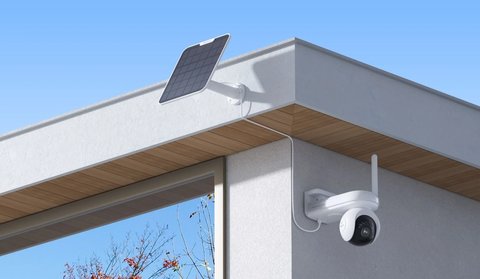
Altas PT Ultra vs eufy S340: Side-by-Side Comparison
| Category | Reolink Altas PT Ultra | eufy SoloCam S340 |
|---|---|---|
| Camera design | Single-lens motorized pan-tilt | Fixed dual-lens (wide + telephoto), pan-tilt base |
| Resolution | 4K (8MP) | 3K wide-angle + 2K telephoto, 8x hybrid zoom |
| Pan / tilt range | 355° pan / 90° tilt | 360° pan / 70° tilt |
| Recording mode | True 24/7 continuous recording capable | Motion-triggered, not built for continuous recording |
| Local storage | microSD, user-supplied | 8GB built-in storage |
| Subscription requirement | None for local recording and live view | None for core features |
| Weatherproof rating | IP65 | IP67 |
| Voice assistant support | Limited compared to eufy’s ecosystem | Works with Alexa Echo Show and Google Chromecast for streaming |
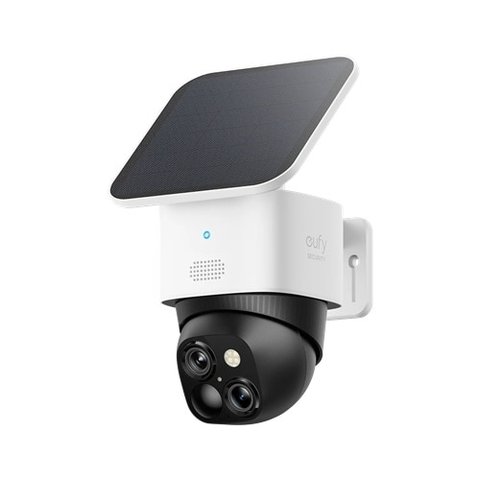
The biggest practical difference is what each brand optimizes for: Reolink leans into continuous, always-on recording backed by a large battery, while eufy leans into a zoomable dual-lens view with tighter smart home integration for households already using Alexa or Google devices.
When the Altas PT Ultra Makes More Sense
- You want genuine 24/7 continuous 4K recording rather than motion-only clips
- You already use other Reolink cameras or an NVR and want a consistent ecosystem
- Detailed AI detection and pan-tilt auto-tracking matter more than optical zoom
When the eufy S340 Makes More Sense
- You want built-in zoom to check distant detail without a dedicated motorized lens
- Alexa or Google Assistant streaming integration is a priority for your household
- Built-in local storage without buying a separate microSD card appeals to you
The dual-lens zoom on the S340 is genuinely useful for checking a specific distant point like a gate, but it doesn’t replace the kind of continuous, always-recording coverage the Altas PT Ultra is built around — they’re solving slightly different problems more than directly competing on the same feature.
Real-World Use Cases: Matching the Camera to Your Property
I’ve set up both types of cameras on properties with different layouts, and the difference that actually matters day to day isn’t the spec sheet, it’s how the area you’re covering is shaped. On a long rural driveway with no clear single vantage point, the Altas PT Ultra’s motorized rotation earned its keep — it tracked a vehicle from the far gate all the way to the house rather than losing it the moment it left one fixed frame. On a smaller suburban yard with a single approach path, the S340’s fixed dual-lens setup covered the whole area from one mounting point, and the telephoto lens let me zoom in digitally on the mailbox without needing the camera to physically move.
- Large or irregularly shaped properties: the Altas PT Ultra’s 355° rotation and tracking cover ground a fixed lens can’t reach from one spot
- Smaller yards or single entry points: the S340’s wide-plus-telephoto combo is usually already enough without needing motorized movement
- Households already using Alexa Echo Show or Google Chromecast: the S340’s tighter smart-home integration makes casual live-view checks more convenient
- Anyone who wants one camera doing double duty as a general security recorder rather than just an event-triggered alert system: the Altas PT Ultra’s 24/7 mode is the better fit
Solar sizing is also worth planning for ahead of time rather than after the battery starts draining faster than expected. Continuous recording and active tracking both pull more power than motion-triggered clips, so if you’re leaning toward the Altas PT Ultra specifically for its 24/7 capability, pair it with the larger 12W panel rather than the 6W option unless your mounting location gets strong, consistent sun for most of the day.
Troubleshooting Common Setup Issues
A handful of issues come up repeatedly with solar pan-tilt and dual-lens cameras generally, and knowing the fix ahead of time saves a lot of back-and-forth with support.
- Camera won’t finish pairing during setup: Confirm you’re connecting to a 2.4GHz Wi-Fi network, not 5GHz. Both the Altas PT Ultra and the S340 pair over 2.4GHz only, and this trips up more first-time setups than any other single issue.
- S340’s telephoto zoom looks soft or pixelated: The 8x figure is a hybrid (digital-assisted) zoom, not pure optical, so image quality does degrade toward the top of the zoom range, especially in low light. Treat anything past roughly 4-5x as a “confirm something is there” tool rather than a way to read fine detail.
- Altas PT Ultra keeps re-tracking the wrong object: Lower tracking sensitivity in the app if there’s background motion like trees or a nearby street. An overly sensitive setting causes the camera to jump between multiple moving targets instead of following one consistently.
- Battery draining faster than the rated estimate: Both cameras’ battery ratings assume moderate activity. Heavy motion traffic, continuous recording, or a poorly angled solar panel can all cut real-world runtime well below the marketing number, so check panel angle and recording mode before assuming a hardware fault.
- eufy app shows the camera as offline after a power blip: Power-cycle the camera by holding the reset button briefly, then give it a minute to reconnect before re-pairing from scratch; a full re-pair is rarely necessary for a simple reconnect.
For full specs, see Reolink’s official Altas PT Ultra product page and eufy’s official SoloCam S340 product page.
Frequently Asked Questions
Does the S340 need a eufy HomeBase to work?
No, it can work standalone over Wi-Fi, though pairing with a HomeBase unlocks additional local storage and multi-camera management features.
Can the Altas PT Ultra zoom in like the S340?
It has digital zoom through the app, but not the S340’s dedicated telephoto lens for optical-style detail at distance.
Do both require a subscription for cloud storage?
Cloud storage is an optional paid add-on for both brands; core local recording and live viewing work without one.
Which one is easier to set up for a first-time buyer?
Both use a straightforward app-based pairing process; neither is meaningfully harder to get running than the other.
Do I need to buy a solar panel separately from the camera?
Yes for both models; the camera and solar panel are typically sold as separate SKUs, though bundle listings that include both are common on Reolink’s and eufy’s own stores and are usually cheaper than buying each piece individually.
Conclusion
Pick the Altas PT Ultra if continuous recording and Reolink ecosystem consistency matter most, and the eufy S340 if a zoomable dual-lens view and tighter Alexa or Google integration fit your household better. Both are capable solar-friendly pan-tilt cameras aimed at the same general use case, just built around different priorities.
Ryan
20+ years of hands-on PC and smart home device testing