Setting Up the EZVIZ TY2 Pan & Tilt Camera
The EZVIZ TY2 is a 1080p indoor pan-and-tilt camera with 360-degree coverage and motion tracking, and it only takes a few minutes to pair once you know it needs a 2.4GHz network specifically. This guide covers the app setup, mounting placement, and the connection issues that come up most.

Download the EZVIZ App and Add the Camera
Install the EZVIZ app, create an account, and tap Add Device to scan the QR code on the base of the TY2. Keep your phone on 2.4GHz Wi-Fi during setup — the TY2 does not support 5GHz networks at all, which is the most common reason pairing fails outright.
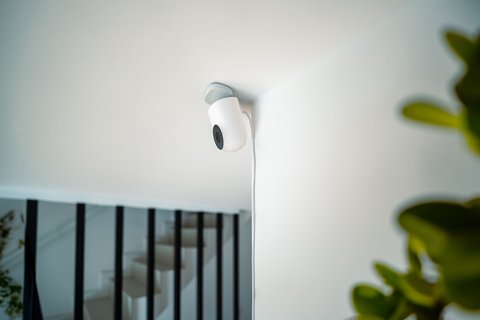
Position It for Full-Room Coverage
A corner mount near the ceiling gives the widest usable field of view since the TY2 pans a full 360 degrees but tilts less. Test motion tracking after mounting by walking through the room — if it consistently misses one side, the camera may be angled too high or too low.
- Keep it at least 2 meters up for the best tracking angle
- Avoid pointing it directly at a window, which causes glare and washed-out night footage
- Insert a microSD card (up to 256GB) and format it in the app before relying on local recording
Set Up Motion Alerts and Two-Way Talk
Turn on push notifications for motion detection in the app’s device settings, and test two-way talk once so you know the microphone and speaker both work before you actually need them.

I set up a TY2 in a home office to keep an eye on a dog during the day, and motion tracking worked reliably as long as the camera stayed in a high corner rather than on a low shelf, where it kept losing track near furniture.
Per Elena V., who uses the TY2 as a pet camera, “Once I moved it to a ceiling corner instead of a bookshelf, the tracking stopped losing my cat behind the couch.”
Common TY2 Problems and Fixes
- Camera won’t pair: confirm your phone and router are broadcasting 2.4GHz, not just 5GHz or a combined band
- Motion tracking misses activity: remount higher and angle it to cover the room’s main walking paths
- No sound on two-way talk: check app microphone permissions on your phone, not just the camera’s own settings
- Frequent disconnects: move the router closer or add a Wi-Fi extender near the camera’s room
For firmware updates and full specs, check EZVIZ’s official TY2 product page. EZVIZ’s TY2 support page also covers cloud storage plan options if you want off-site backup.
Frequently Asked Questions
Does the TY2 work without Wi-Fi?
Local recording to a microSD card works without internet, but remote viewing and notifications need an active Wi-Fi connection.
Can the TY2 track more than one person?
It follows the most prominent moving subject in frame rather than tracking multiple targets simultaneously.
Is a subscription required to use the TY2?
No, live viewing and local microSD recording are free. EZVIZ CloudPlay is an optional paid subscription for cloud backup.
How far can the TY2 see at night?
Its infrared night vision covers up to about 10 meters in dim conditions.
Conclusion
The EZVIZ TY2 is an easy, affordable pan-tilt camera as long as you mount it high in a corner and remember it needs 2.4GHz Wi-Fi specifically. Most setup problems trace back to the Wi-Fi band or a low mounting spot rather than the camera itself.
Ryan
CS degree · 15 years hardware troubleshooting