The Link3 sits at the top of xDuoo’s dongle DAC range, aimed at people who want desktop-amp levels of power and features squeezed into something that still fits in a pocket. It replaces the single-DAC design of earlier Link models with a dual ES9039Q2M chip configuration and an XMOS XU316 USB receiver, a combination usually reserved for larger desktop units rather than USB dongles.
| Spec | Detail |
|---|---|
| DAC Chips | Dual ESS ES9039Q2M |
| USB Receiver | XMOS XU316 |
| Outputs | 3.5mm single-ended, 4.4mm balanced |
| Format Support | PCM up to 32-bit/768kHz, native DSD512 |
| Power Output | Up to 700mW at 32 ohms normal, up to 1000mW in Super Power Mode |
| Storage | Built-in MicroSD slot |
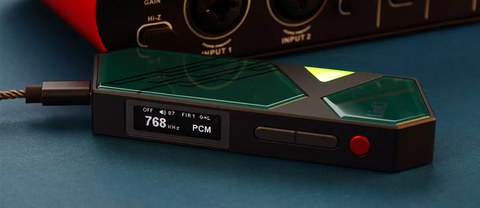
Key Specifications
- DAC chips: dual ESS ES9039Q2M
- USB receiver: XMOS XU316
- Outputs: 3.5mm single-ended and 4.4mm balanced headphone jacks
- Format support: PCM up to 32-bit/768kHz and native DSD512
- Power output: up to 700mW at 32 ohms in normal mode, up to 1000mW in Super Power Mode with external power connected
- Storage: built-in MicroSD card slot for offline playback
The MicroSD Slot Is the Standout Feature
Most dongle DACs are purely pass-through devices with no storage of their own. The Link3 breaks from that by including a MicroSD slot, which effectively lets it double as a lightweight standalone player when paired with any phone or laptop that can browse its file system, or even used independently depending on firmware support. This is a meaningful differentiator compared to rival dongles in a similar price bracket, and reviewers at outlets such as Porta-Fi called it out as one of the Link3’s more unusual selling points.
Super Power Mode Explained
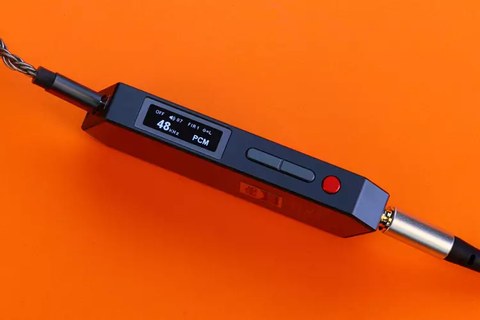
By default, the Link3 draws all of its operating power from the connected phone or laptop’s USB port, which caps output at 700mW to avoid draining the host device too quickly. Attaching an external power source through the secondary USB-C port unlocks Super Power Mode, pushing output up to 1000mW at 32 ohms. This matters mainly for owners of harder-to-drive planar or full-size headphones, since most in-ear monitors will never need anywhere close to that much power.
Setting It Up
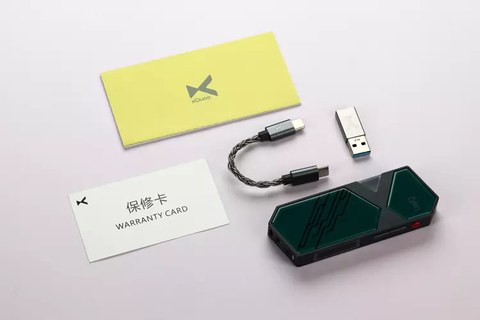
- Connect the Link3 to your phone or laptop’s USB-C port using the supplied cable.
- Insert a MicroSD card if you plan to use the built-in storage feature.
- Choose single-ended or balanced output depending on your headphone cable termination.
- For maximum power, connect a second USB-C power source to the auxiliary port to enable Super Power Mode.
- Use the onboard buttons to cycle through filter and gain settings shown on the small OLED display.
Who Should Buy the Link3 Over a Cheaper Dongle
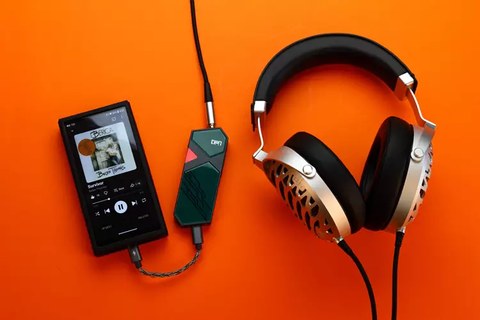
If you exclusively use efficient IEMs and stream from a phone, a cheaper Link2 will likely sound extremely close for a fraction of the price. The Link3 earns its higher cost with owners of harder-to-drive headphones, anyone who wants offline storage without carrying a separate DAP, or desk-based listeners who want one small device to handle both portable and semi-desktop duty.
How It Holds Up Against Rival Flagship Dongles
The dongle DAC category has gotten crowded, with several brands now offering dual-DAC, high-power designs in the same general price bracket as the Link3. What tends to separate xDuoo’s entry is the combination of the MicroSD storage option alongside the raw power figures, since most competing dongles focus purely on DAC performance and skip storage entirely. If offline playback without a phone attached matters to your use case, that alone can be the deciding factor over a rival dongle with marginally different measured specifications.
Practical Battery and Heat Considerations
- Because the Link3 draws power from the host device rather than an internal battery, running it in Super Power Mode will noticeably drain a phone’s battery faster during extended sessions
- The metal housing can get warm during long high-power sessions, which is normal for a device pushing this much output through such a compact enclosure
- Using standard mode rather than Super Power Mode for typical IEM listening avoids unnecessary battery drain on your source device
Firmware and Filter Customization
Like most modern xDuoo products, the Link3 receives occasional firmware updates that can add filter presets or fix minor bugs reported by early adopters. Checking for updates through xDuoo’s official channels periodically is worth doing, since the small OLED screen and button interface allow for genuinely useful digital filter switching once a firmware supports more options, letting you tune the presentation slightly toward a warmer or more analytical character depending on the recording and your headphones.
Traveling With the Link3
The compact form factor makes it an easy addition to a travel bag alongside a laptop or tablet, and the included MicroSD slot becomes particularly useful here, since you can preload a card with your favorite albums as a backup in case hotel WiFi makes streaming unreliable. Combined with the higher power ceiling for driving full-size headphones, many travelers find the Link3 covers both airplane listening with efficient IEMs and hotel-room listening with larger over-ear headphones, without needing to pack a separate desktop amp.
Common Link3 Problems and Fixes
- No sound or device not recognized: Try a different USB-C cable and confirm the cable supports data transfer, not just charging. Some cheap cables are power-only and won’t carry audio.
- Output sounds noticeably quieter than expected: Check that Super Power Mode is engaged if using demanding planar or full-size headphones, since standard mode caps output at 700mW.
- Phone battery drains fast while using the Link3: This is expected in Super Power Mode since it draws extra current from the host device. Switching to standard mode for everyday IEM listening reduces the drain considerably.
- MicroSD card not detected: Reformat the card to FAT32 or exFAT on a computer first, and confirm it’s seated fully in the slot, since a partially inserted card is a common cause of detection failures.
- Housing feels uncomfortably hot: Some warmth is normal under sustained high-power output, but if it feels excessive, drop out of Super Power Mode and give the device a break between long listening sessions.
FAQ
Does the Link3 need Super Power Mode to sound good?
No, it performs well in standard mode with most headphones; Super Power Mode is only necessary for power-hungry full-size or planar headphones.
Can I play music directly from the MicroSD card without a phone attached?
Storage functionality is primarily designed to work alongside a connected source device rather than as a fully standalone player, so check current firmware notes for the latest capability.
Is the Link3 compatible with gaming handhelds?
Yes, as a standard USB audio class device it works with most handhelds that support USB-C audio output, including several Windows-based gaming handhelds.
What headphone impedance range is the Link3 best suited for?
It comfortably drives most headphones from 16 ohms up through moderately demanding 300 ohm loads, particularly in Super Power Mode.
Does it support both single-ended and balanced cables at the same time?
Both outputs are present on the unit, but you would typically use one or the other depending on which termination your headphone cable has.
Does the Link3 get noticeably warm during normal use?
Standard mode listening generates minimal heat, though extended sessions in Super Power Mode can make the metal housing noticeably warm to the touch, which is expected given the power being delivered.
Dongle DACs like this one live in my laptop bag permanently at this point, and the Link3 has stayed in mine longer than most of the ones I have tested.