Dongle DACs used to be a compromise category — convenient, but never quite good enough to satisfy anyone who cared about measurements. The FiiO QX13 is one of the clearer signs that this is no longer true. It sits at the top of FiiO’s dongle DAC/amp lineup, and it has drawn enough attention that it now has its own discussion thread over on Audio Science Review’s forum, a community generally not known for going easy on portable audio gear. I dug into the spec sheet, several independent reviews, and that ASR thread to put together an honest picture of what the QX13 actually offers.
| DAC Chip | 8-channel ESS SABRE PRO ES9027PRO |
| USB Interface | XMOS digital audio interface |
| Max Output Power | Up to 900mW per channel (32 ohm load) |
| EQ Support | Built-in parametric EQ, device or app controlled |
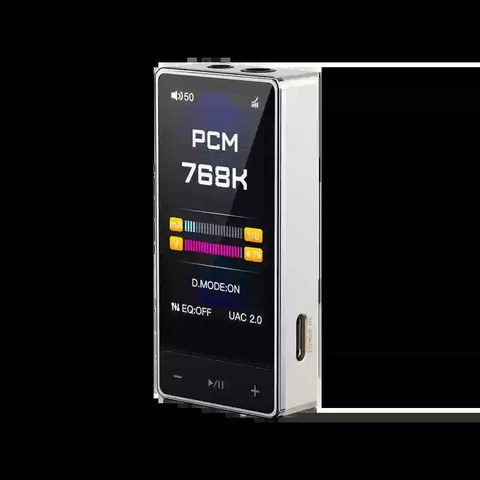
| Display | Built-in screen for format, sample rate, volume |
| Modes | Portable mode and desktop mode |
| Housing Material | Carbon fiber shell |
| Connection Type | USB-C dongle DAC/amp |
Why the QX13 gets discussed on Audio Science Review
Audio Science Review is a forum built around objective measurements, so when a product shows up there it usually means enthusiasts are either praising its numbers or picking apart a specific issue. There is a real ASR thread titled “Fiio QX13 problems” where users compare notes on their units. Rather than repeating specific measurement numbers that I have not independently verified myself, the honest takeaway is simply this: the QX13 is popular enough and technically interesting enough that it has organic discussion on one of the most measurement-focused audio forums around, which says something about how seriously the enthusiast community takes it.
What is actually inside the QX13
FiiO built the QX13 around an 8-channel ESS SABRE PRO DAC, specifically the ES9027PRO chip, paired with an XMOS USB interface for handling digital audio transfer from your source device. Using eight DAC channels internally, rather than a single stereo chip, is typically done to lower distortion and improve dynamic range compared to cheaper single-chip dongle designs.
- 8-channel ESS SABRE PRO DAC (ES9027PRO)
- XMOS USB digital audio interface
- Built-in display for status and settings
- Parametric EQ support adjustable from the device or a companion app
- Desktop mode for stationary, higher-power use
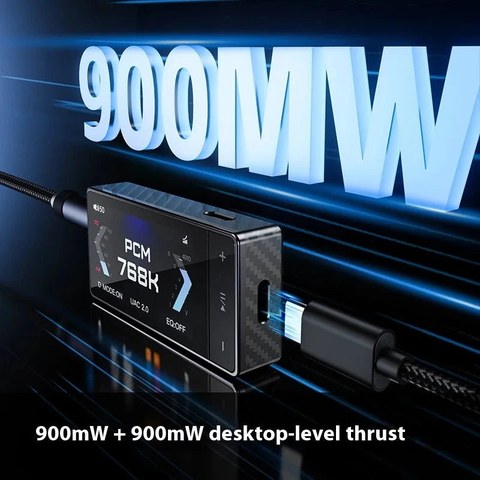
- Up to 900mW per channel into a 32 ohm load
- Carbon-fiber shell construction
That 900mW per channel figure is unusually high for a dongle-format device. Most USB dongle DACs top out well below that into the same 32 ohm load, which is why several reviewers, including Prime Audio, specifically noted that the QX13 can drive headphones that would normally require a separate desktop amplifier.
Sound signature and tuning
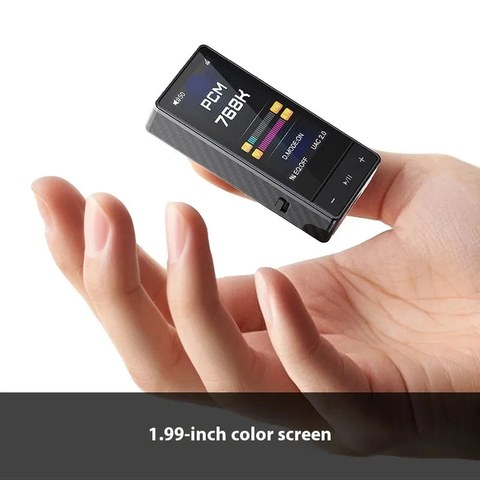
Reviewers describe FiiO’s house tuning on the QX13 as neutral, natural, and highly resolving once the built-in parametric EQ is switched off. That is a meaningful detail if you are coming from consumer dongles that apply a heavier bass or treble boost by default. MajorHiFi and Headfonia both frame the QX13 as a reference-leaning device rather than a warm or colored one, which tends to appeal to listeners who want their headphones or IEMs to sound the way the recording engineer intended rather than the way a manufacturer thinks will sound impressive on a store demo.
The built-in parametric EQ is there for people who want to customize the signature, whether that means correcting a known peak in a particular headphone or just adjusting to personal preference. Having that adjustment available directly on the device, rather than only through a phone app, is a convenience that matters more than it sounds like on paper, especially when using the QX13 with a laptop where installing extra software is not always practical.
Desktop mode and the display
Desktop mode is worth calling out specifically because it changes how the QX13 behaves when it is sitting stationary rather than being carried around. In that mode, the device can prioritize sound quality and output power over battery conservation, since it assumes a steadier power source and less concern about heat buildup in a pocket. Combined with the built-in display, which shows format, sample rate, and volume information at a glance, the QX13 straddles the line between a portable dongle and a small desktop DAC/amp.
Build quality
The carbon-fiber shell is a departure from the plain aluminum or plastic housings found on cheaper dongle DACs, and it gives the QX13 a distinct look on a desk or in a bag. Carbon fiber also tends to be lighter than a comparably sized metal housing while remaining durable, which matters for a device that is likely to get tossed in and out of a laptop bag repeatedly. Audiophile Heaven specifically highlighted how compact the housing feels relative to the power and feature set packed inside it.
Who should consider the QX13
If you already own headphones or IEMs capable of resolving detail but have been feeding them from a phone’s built-in headphone output, or from a basic budget dongle, the QX13 is a significant step up in both raw output power and DAC resolution. It particularly suits listeners with harder-to-drive headphones who still want something pocketable rather than a full desktop stack. If you are happy with a simpler, cheaper dongle and do not own gear that benefits from the extra power or the parametric EQ, the QX13’s flagship-tier price may be more than you need.
Common QX13 problems and how to fix them
Like any USB dongle DAC, the QX13 can run into a handful of predictable issues, especially when it is first paired with a new phone or laptop. None of these are unique to FiiO’s design, but knowing the fix ahead of time saves a lot of troubleshooting time.
- No sound after connecting: Confirm the source device is actually routing audio output to the USB DAC instead of its internal speaker or headphone jack. On phones, this usually means checking the system sound output selector after plugging in.
- Device not recognized by a laptop: Try a different USB-C cable or port, since some cables are charge-only and lack the data lines needed for audio. A firmware update from FiiO’s support page can also resolve recognition issues tied to older USB controller drivers.
- Distorted or clipped audio at high volume: This is often a source-level issue rather than a QX13 fault. Lower the output volume on the source device itself and let the QX13 handle final volume control, since feeding it an already-clipped signal will distort regardless of the DAC’s own headroom.
- EQ settings not saving between sessions: Make sure the companion app has fully synced before disconnecting the device, and check for a firmware update, since early firmware revisions on similar FiiO dongles have occasionally shipped with EQ persistence bugs that later updates addressed.
- Overheating in desktop mode during long sessions: Desktop mode intentionally trades battery efficiency for output power, which generates more heat. Placing the QX13 on a stand rather than directly on a laptop chassis improves airflow and reduces thermal buildup during extended listening.
FAQ
Is the FiiO QX13 discussed on Audio Science Review?
Yes, there is an active forum thread on Audio Science Review discussing user experiences with the QX13, which is notable given how measurement-focused that community typically is.
What DAC chip does the QX13 use?
It uses an 8-channel ESS SABRE PRO DAC, specifically the ES9027PRO, paired with an XMOS USB interface.
How powerful is the QX13’s amplifier stage?
It is rated up to 900mW per channel into a 32 ohm load, which is high for a dongle-format DAC/amp and allows it to drive many harder-to-drive headphones.
Does the QX13 support EQ adjustments?
Yes, it includes built-in parametric EQ support, adjustable from the device itself or a companion app.
What is desktop mode on the QX13?
It is a mode that favors sound quality and output power over battery efficiency, intended for use when the device is stationary rather than carried around.
I have been building and testing portable audio setups for longer than I would like to admit, and dongle DACs like the QX13 are exactly the kind of gear that keeps changing my mind about what a phone-based listening rig can sound like.