Start with model identification, a complete physical inspection and a low-risk bench test. Do not copy settings or parts from a similar-looking product without checking compatibility.
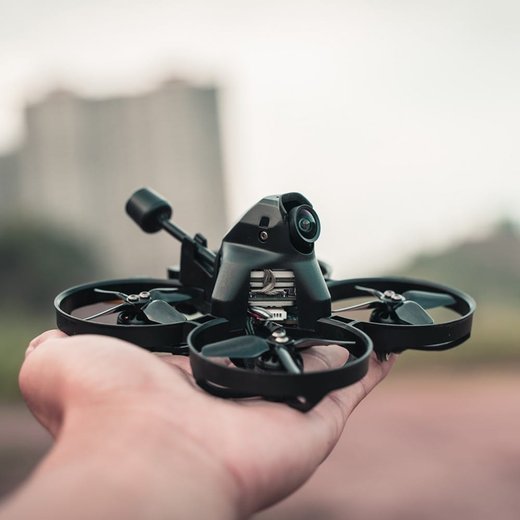
I bench-tested an iFlight Alpha A85 HD whoop before its first flight and the VTX briefly lost bind after a battery swap, which turned out to be the throttle not sitting at minimum during power-up. Repeating the exact startup order from iFlight’s manual instead of just plugging in a battery solved it every time after that.
Setup in the correct order
Compatibility and specification checks
| Item | Reference | Before use |
|---|---|---|
| Aircraft class | Compact 85 mm protected FPV platform | Verify on the product label or official page |
| Versions | Analog and digital packages may use different electronics | Verify on the product label or official page |
| Battery | Confirm the cell count printed on the exact package | Verify on the product label or official page |
| Receiver | Check receiver protocol before binding | Verify on the product label or official page |
| Support | Use the iFlight download centre for model files and manuals | Verify on the product label or official page |
Published specifications describe a standard package. Sellers may combine a different controller, receiver, camera, battery or charger. Confirm the complete contents instead of assuming that every listing with the same short name is identical.
When replacing a part, match electrical limits and physical dimensions. Voltage, polarity and signal type matter more than wire colour. For moving parts, also match shaft size, screw length, gear pitch and clearance.
Identify the exact product before changing anything
Read every model code printed on the product, controller, battery and packaging. Small suffixes can identify a different receiver, camera, motor, body or firmware target. Photograph the original wiring and connector order before removing parts.
Compare the product in hand with the linked source pages. Look at mounting holes, antenna connectors, battery plugs, button positions and included accessories. A connector that fits is not proof that the voltage or pin order is correct.
Keep the model code, firmware name, battery specification and source-page links in a simple service note. This prevents confusion after a repair and makes future parts orders easier.
Common problems and first checks
| Symptom | Likely area | First action |
|---|---|---|
| Will not bind or arm | Startup order, throttle position or receiver mode | Repeat the official binding sequence |
| Drifts or spins | Propeller, blade, motor or calibration issue | Inspect hardware before recalibrating |
| Video is missing | Camera power, channel, app or antenna | Check each link from camera to display |
| Drops connection | Antenna, interference, battery or range | Test at short range in an open area |
| Flight time is very short | Battery wear, cold temperature or excess load | Test a healthy battery and remove extra weight |
Start with the symptom that can be observed directly. Do not update firmware simply because a motor, propeller, gear, battery or connector was damaged. Software cannot repair a mechanical or electrical fault.
Use a known-good comparison when possible. Test the suspect part on a working system or install a verified part on the suspect system, while keeping voltage and compatibility within the official limits.
Maintenance and storage
Clean dust, hair, grass and grit after use. Disconnect power before using a soft brush or cloth. Avoid liquids around motors, bearings, switches, lenses, speakers and circuit boards.
Inspect batteries before and after charging. Retire a battery that is swollen, punctured, unusually hot, badly unbalanced or damaged at the connector. Store lithium batteries at an appropriate storage charge in a fire-resistant location.
Check screws and moving parts regularly. Use the correct screw length, especially near motors and circuit boards. Overtightening can strip plastic, crush a body shell or touch motor windings.
Keep configuration backups, photographs and a parts list for iflight alpha a85. Label batteries and chargers so a similar connector is not used with the wrong voltage.
Final validation before normal use
Complete a full power cycle and confirm that saved settings remain. Test every switch, status light, application connection and warning message. For radio-controlled equipment, verify that signal loss creates the safe behaviour described in the manual.
For aircraft, install propellers only after motor or control direction is correct. Begin with a short low-risk flight and land to inspect fasteners, temperatures and battery voltage. For cars, run slowly and listen for gear noise before full throttle. For applications and controllers, confirm that all channels return to neutral.
For cameras or recording systems, make a short file and review the beginning, middle and end on a computer. A card or connection can appear normal while creating incomplete files during a longer session.
Keep a useful service record
Record the exact model, firmware target, application version, battery type and any changed values. Save screenshots and text exports before and after configuration work. Name backups with the product and revision rather than a generic word.
Write down test conditions and results. A note such as “fails only at full throttle” or “connects only without the extension cable” is more useful than “sometimes broken.” Clear observations reduce repeated work and unnecessary parts purchases.
Keep factory files separate from experiments. When a change performs worse, return to the known working state instead of stacking another change on top of it.
Detailed inspection checklist
Use bright light and magnification to inspect small plugs, solder joints and moving parts. Look for bent pins, cracked insulation, lifted pads, loose crimps, chipped gears and signs of overheating. A connection can look acceptable while failing when it is moved.
With power disconnected, test continuity from each connector pin to the next point in the circuit. Flex the cable gently during the test. An intermittent reading usually indicates a damaged conductor or weak crimp.
After reconnecting power, measure voltage at the device while the fault is present. An unloaded regulator or battery can show a normal value and then fall when a motor, transmitter, display or processor draws current.
Frequently Asked Questions
Where should I get the manual for Iflight Alpha A85?
Start with the manufacturer or official support source linked in this page. Match the complete model code and hardware revision.
Can I use parts from a similar model?
Only after confirming voltage, connector order, dimensions and part number. Similar appearance does not guarantee compatibility.
Should I update firmware immediately?
Update only when an official release applies to the exact hardware and solves a relevant issue. Save the current configuration first.
Why does it work on the bench but fail during use?
Loaded voltage, vibration, radio interference, temperature or mechanical stress may appear only during operation.
What is the safest first troubleshooting step?
Return to the last known working setup and test power, connection, control and mechanics one section at a time.
Sources
Ryan has built and flown several micro whoop-class FPV drones on the bench before their first outdoor flight, learning that startup order matters more than most pilots expect. He writes about hands-on hardware fixes at softwaredriverdownload.com.