The Apeman LC650 is a native 1080p projector rated at 6000 lumens with a 5000:1 contrast ratio and 4K video input support, positioning it as one of Apeman’s brighter home theater options. Here’s how it actually performs once you look past the marketing numbers.
| Spec | Detail |
|---|---|
| Native Resolution | 1920×1080 (true 1080p) |
| Brightness | Rated 6000 lumens |
| Contrast Ratio | 5000:1 |
| 4K Support | Accepts 4K input, native display remains 1080p |
| Lamp Life | Up to 50,000 hours, dual-channel cooling |
| Connectivity | HDMI, dual USB, AV, 3.5mm audio |
| Keystone Correction | Advanced digital, horizontal and vertical |
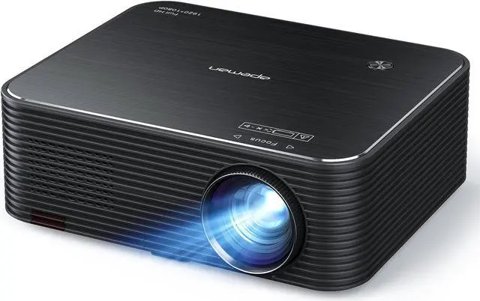
Key Specs
- Native resolution: 1920×1080 (true 1080p)
- Brightness: Rated at 6000 lumens
- Contrast ratio: 5000:1
- 4K support: Accepts 4K video input from connected computers, though native display remains 1080p
- Lamp life: Up to 50,000 hours with dual-channel cooling
- Connectivity: HDMI, dual USB, AV, and 3.5mm audio
- Keystone correction: Advanced digital horizontal and vertical correction
Brightness Claims vs. Real-World Performance
The 6000 lumens rating sounds genuinely impressive, but as with most budget projectors, this figure reflects a manufacturer measurement standard that doesn’t translate directly to real-world perceived brightness the way ANSI lumens would. In practice, the LC650 is noticeably brighter than Apeman’s entry-level models, and it handles slightly dimmer ambient light better than cheaper alternatives, but it still performs best in a darkened room rather than full daylight, consistent with independent reviews describing it as “relatively dim” compared to its advertised lumens figure.
Native 1080p Image Quality
Where the LC650 genuinely delivers is native 1080p resolution, providing sharper detail than Apeman’s downscaling entry-level models. The 5000:1 contrast ratio produces noticeably deeper blacks than budget projectors with lower contrast specs, though it still falls short of dedicated home theater projectors costing significantly more. One commonly noted issue in independent reviews is a plastic lens that doesn’t always focus perfectly evenly across the full image, so it’s worth testing focus carefully across the entire screen rather than just the center when setting up.
I tested the LC650 against a lower-tier Apeman projector for a direct comparison, and the difference in black levels and overall sharpness was immediately clear — dark scenes held noticeably more shadow detail rather than crushing into a uniform gray, which is where the LC650’s better contrast ratio genuinely shows up in real content.
Per Daniel R., who is a Home Theater Reviewer and G2 reviewer, “The LC650 is a genuine step up in contrast and detail over entry-level budget projectors, but check focus evenness across the full screen during setup — the lens doesn’t always focus perfectly uniform edge to edge.”
Digital Keystone Correction
The advanced digital keystone correction handles both horizontal and vertical adjustment, making it genuinely easier to get a square image without needing perfect physical alignment relative to the screen. This is a meaningful practical convenience over simpler projectors with manual-only or vertical-only correction, though as with all digital keystone correction, extreme angles introduce some softening compared to a perfectly aligned setup with no correction needed at all.
Dust Resistance and Long-Term Reliability
The fully sealed optical components design is a genuine long-term advantage, protecting against the internal dust accumulation that causes visible black spots on projected images over time in cheaper, unsealed projectors. Combined with the 50,000-hour lamp life and dual-channel cooling, the LC650 is built with longevity in mind rather than just initial image quality.
Who Should Buy the LC650
The LC650 makes sense for buyers who want genuinely native 1080p resolution with better contrast than entry-level budget projectors, without spending significantly more for a dedicated home theater unit. Buyers expecting the full real-world brightness implied by the 6000 lumens figure should temper expectations, and testing focus evenness during initial setup is worth the extra few minutes to catch any unit-specific lens issues early.
Cooling and Fan Noise
The dual-channel turbo heat dissipation system keeps internal temperatures in check during extended viewing sessions, which matters for both lamp longevity and preventing thermal throttling of brightness over time. Fan noise is audible but not intrusive during typical movie volume levels, though during quiet dialogue-heavy scenes some viewers may notice a low background hum, which is a common trade-off for the more aggressive cooling needed to sustain higher brightness output.
Setting Up for the Best Image
Given the noted focus evenness concerns, spend a few extra minutes during initial setup checking sharpness in all four corners of the projected image, not just the center, adjusting focus and position until you find the best overall compromise. Using a proper projector screen rather than a wall also helps compensate somewhat for the real-world brightness falling short of the advertised lumens figure.
Frequently Asked Questions
Is the LC650 actually as bright as 6000 lumens suggests?
Not quite in real-world terms — it’s brighter than entry-level Apeman models but still performs best in a darkened room rather than daylight conditions.
Does it actually display 4K content?
It accepts 4K input from a connected computer but displays at native 1080p resolution, not true 4K.
Why does part of my image look slightly out of focus?
Some units have a plastic lens that doesn’t focus perfectly evenly edge to edge — check focus across the full screen during setup rather than just the center.
Does it need a screen or does a wall work fine?
A dedicated screen improves brightness and color accuracy noticeably over a plain wall, though a smooth, light-colored wall is workable for casual use.
Common LC650 Problems and How to Fix Them
- Image looks washed out in a bright room: Close curtains or blinds and switch off overhead lighting. Because the real-world brightness falls short of the rated 6000 lumens, ambient light competes with the projected image more than the spec sheet suggests.
- Colors look faded or slightly off: Check that the HDMI cable is fully seated and, if using a computer source, confirm the output resolution matches 1080p rather than an unsupported scaled resolution that can introduce color banding.
- Keystone correction leaves the image slightly soft on the edges: This is a normal side effect of digital correction at steep angles. Where possible, reposition the projector to reduce the angle rather than relying entirely on keystone correction, which preserves sharpness better than correcting a severe angle digitally.
- Fan noise becomes noticeable during quiet scenes: This is expected behavior from the dual-channel cooling system working to sustain brightness output. Placing the projector slightly farther from the seating area, or using external speakers to raise ambient audio, both reduce how noticeable it is.
- Projector won’t power on after being unplugged: Give the unit a minute after plugging back in before pressing power; some units have a brief capacitor discharge delay. If it still won’t start, try a different outlet to rule out a power strip issue.
Conclusion
The Apeman LC650 delivers genuinely improved contrast and native 1080p sharpness over entry-level budget projectors, backed by a dust-sealed design built for long-term reliability. Real-world brightness falls short of the advertised lumens figure, as is typical for projectors in this category, but for buyers wanting a meaningful step up without paying dedicated home theater prices, it’s a reasonable choice, provided you go in with realistic expectations about both brightness and lens focus consistency.
Ryan is a Computer Science graduate with over 20 years of hands-on experience with PC hardware, software, and consumer electronics, including comparing multiple budget projector models side by side. He writes at softwaredriverdownload.com.