| Description |
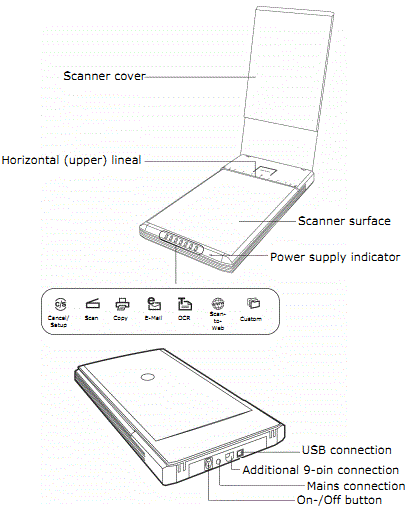
Medion USB Flatbed Scanner MD 90070 Specifications
| Type of scanner |
USB flat bed scanner |
| Scanning method |
Single Pass |
| Scanning modes |
|
| Colour |
48 Bit (internal) |
| Gray scale |
12 Bit (internal) |
| Text/line |
1 bit (internal) |
| Original size |
A4/Letter (216 x 297 mm) |
| Resolution |
4800 x 9600 dpi |
| Interface |
USB 2.0 Hi-Speed |
| Dimensions |
approx. 457 mm (l) x 248 mm (w) x 39 5 mm (h) |
| Weight |
2.1 Kg |
| Operating environment |
|
| Temperatures |
10° C – 40° C/50°F to 104°F |
| Humidity (relative) |
35 % – 80 % |
Medion USB Flatbed Scanner MD 90070 Driver Isntallation Steps
- Download sca90070up.exe
- Close all other running applications
- Unplug the USB scanner cable
- Run sca90070up.exe, files will be extracted into C:\Medion folder.
- You will find MD90070.exe in C:\Medion folder. Run it.
- Unfortunately I am using a Windows 7 64bit notebook. Immediately after running MD90070.exe, I was prompted with an error message
[The version of this file is not compatible with the version of Windows you're running. Check your computer's system information to see whether you need and x86 (32-bit) or x64 (64-bit) version of the program, and then contact the software publisher.]
- I managed to extract MD90070.exe and found 2 files: S280.EXE and SM2232.DLL. I tried to run S280.EXE and another window pop up:
[ScanWizard 5 Patch File for MD 90070
Patch file installation failed. This patch file is for ScanWizard 5 V7.00]
Details on SM2232.DLL:
- Microtek Scanner Driver
- ver. 5.00.1636.1
- Microsoft Windows NT
- Original Filename: SCANNER.DLL
- Lastly after the update is finnished you can plug the USB scanner cable again.
|