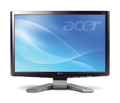
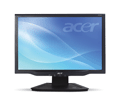
| Applies To | Acer P191W and X191W LCD monitors | ||||
|---|---|---|---|---|---|
| Author | Acer International Electronic AG | ||||
| Driver Date | 06/19/2007 | ||||
| Driver Version | ver. 1.0.0 | ||||
| File Name | Acer191W.zip | ||||
| File Size | 753 KB | ||||
| Requirements | Windows Vista, Windows XP, Windows XP | ||||
| Description | If you are looking for Acer 191W LCD driver, you will need to identify which model your LCD is, because there are two related 191W models on Acer driver download page: P191W and X191W.
See images below to identify whether your Acer LCD monitor is P191W or X191W
To install the driver for your Acer 191W, do to display properties and click update drivers. When Windows ask for the driver, select the folder with correct .INF file and click continue. Windows will install the correct driver after that. |